Implementation Phase (/lead-dev-os:step3-implement-tasks)
The implementation phase executes task groups produced by /lead-dev-os:step2-scope-tasks. Each task group contains context directives (which files from agents-context/ to load) and atomic tasks derived from the spec. Templates and examples are co-located with each skill for reference.
The main conversation acts as the orchestrator of a small agent team: planner subagents (pre-plan groups in parallel), executor subagents (implement one group each in a fresh context), and three verification agents — an implementation-reviewer and a test-verifier that check every group before it’s committed, and an adversarial-thinker that challenges the plans before code is written and attacks the finished feature before delivery.
Three execution modes control how much human oversight the AI receives during implementation. The verification agents run in every mode; the modes differ in who acts on their findings — the orchestrator (bounded fix cycles) or the lead (at review gates).
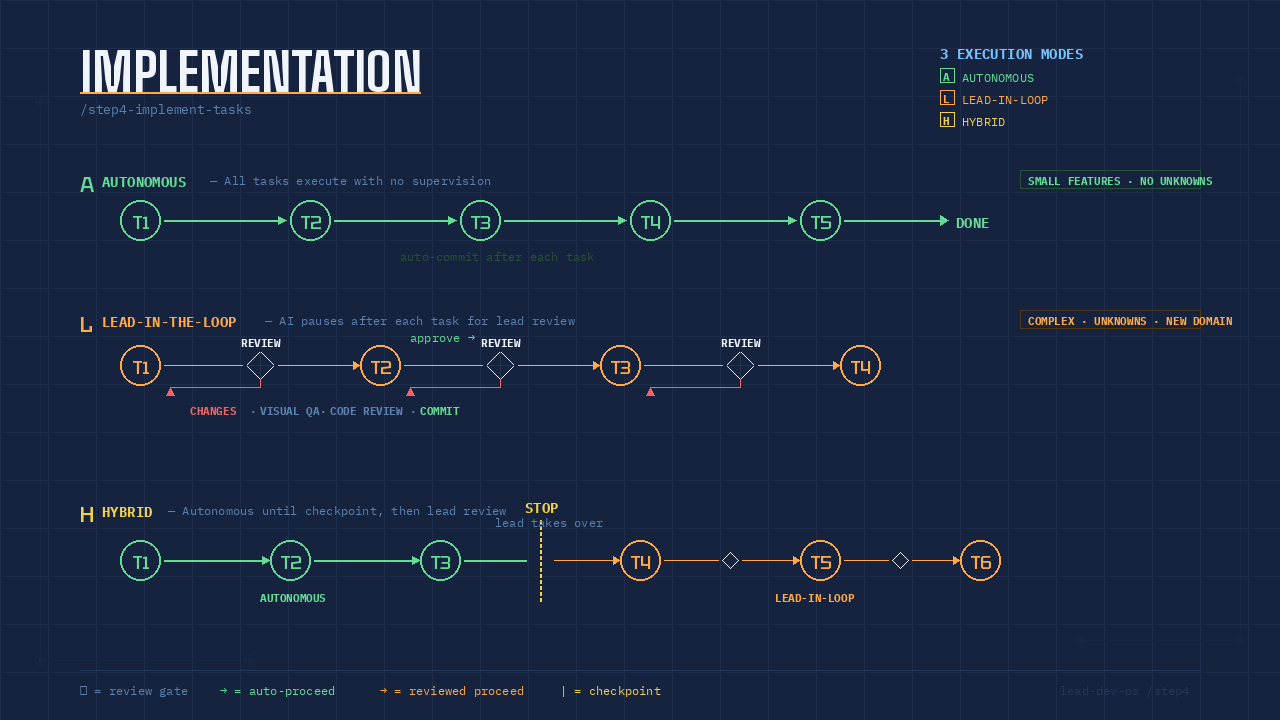
Mode A: Autonomous
All task groups are pre-planned in parallel (one planner subagent per group produces plans/group-N.md), the adversarial-thinker challenges the plan batch, and an execution schedule of parallel waves is derived — groups share a wave only when they have no dependency on each other and disjoint file sets. You approve the batch and schedule, then execution runs with no human intervention. The main conversation acts as an orchestrator: each group is executed by a fresh executor subagent with a clean context; the orchestrator re-runs the group’s tests itself, dispatches the implementation-reviewer + test-verifier pair in parallel, drives a bounded fix cycle on blocking findings (max 2 rounds, then it stops and asks you), and commits — one atomic commit per group.
Committing is a gate, not a formality: a group is not complete until its commit exists, and the next wave is not dispatched while the current wave’s work is uncommitted. Each wave starts from a clean working tree so every dirty path afterwards is attributable to a group in that wave; in a parallel wave the orchestrator stages each group’s paths explicitly from the manifest its executor reported, never the whole tree, so concurrent groups still land as separate atomic commits.
        plan G1..G4 (parallel) → adversarial challenge → approve batch + waves
Wave 1  G1 ⇒ executor → verify pair → commit
Wave 2  G2 ⇒ executor → verify pair → commit ─┐
        G3 ⇒ executor → verify pair → commit ─┘  (G2 ∥ G3 — same wave)
Wave 3  G4 ⇒ executor → verify pair → commit → adversarial review → DONE
Best for: Small features, well-understood domains, no unknowns in the spec. The spec and task definitions are clear enough that the agent can ship without review.
Mode L: Lead-in-the-Loop
The agent plans and implements one task group in the main conversation (using Claude Code’s native plan mode per group), then pauses and waits for the lead developer to review before continuing. This creates a feedback loop at every group boundary — and keeps the work visible, which is why L mode does not delegate execution to subagents. The verification agents still run: after each group’s tests pass, the implementation-reviewer and test-verifier report into the review gate, so the lead reviews with machine-found issues already surfaced and decides what gets fixed.
G1 → [REVIEW] → G2 → [REVIEW] → G3 → [REVIEW] → G4
         ↑                ↑                ↑
      lead reviews     lead reviews     lead reviews
At each review gate, the lead can:
- Visual QA — Check the UI, behavior, or output matches expectations.
- Code review — Inspect the diff via git GUI (e.g., GitLens, GitHub Desktop,
lazygit). - Request changes — Prompt the agent with modifications, missing edge cases, or corrections. These are “just-in-time” adjustments that stay within the spec’s scope.
- Commit — Either let the agent auto-commit or commit manually with a curated message.
- Continue — Approve and move to the next task.
Best for: Complex features, new domains, specs with unknowns, or any work where the lead wants tight control over quality and direction.
Mode H: Hybrid
Implementation starts in autonomous mode (orchestrator + executor subagents, as in Mode A) and switches to lead-in-the-loop at a defined checkpoint. The lead specifies which task group triggers the handoff.
G1 → G2 → G3 ── STOP ── G4 → [REVIEW] → G5 → [REVIEW] → G6
|← autonomous →|        |←────── lead-in-the-loop ──────→|
The autonomous portion handles scaffolding, boilerplate, or well-defined setup tasks. The lead takes over at the checkpoint where decisions, integrations, or nuanced implementation begins.
Best for: Features where the first N tasks are mechanical (DB migrations, file scaffolding, API stubs) but later tasks require judgment (business logic, UI polish, integration points).
Choosing a Mode
| Signal | Mode |
|---|---|
| Spec is tight, domain is known, low risk | Autonomous |
| New domain, unclear edge cases, high visibility | Lead-in-the-Loop |
| Mix of boilerplate + complex logic | Hybrid |
| Prototype / spike / throwaway | Autonomous |
| Production feature with stakeholder scrutiny | Lead-in-the-Loop |
When you run /lead-dev-os:step3-implement-tasks, the skill reads the > Size: estimate from spec.md (written by step 1) and recommends a mode — Small→A, Medium→H, Large→L — then prompts you to select (A / L / H). You always decide. If you choose Hybrid, it also asks which task group number to use as the checkpoint.
After Implementation
Once all task groups are complete, the skill closes with three gates before suggesting archive:
- Adversarial delivery review — the adversarial-thinker (a fresh, read-only agent) attacks the finished feature: concrete failure scenarios, edge cases the tests miss, regressions in adjacent behavior, acceptance criteria satisfied in letter but not intent. Confirmed in-scope defects get fixed (bounded); everything else is reported.
- Full-suite backstop — the entire test suite runs once (the only full-suite run in the workflow; per-group runs stay feature-scoped for fast feedback). New failures caused by the feature get fixed; pre-existing failures get reported, not fixed.
- Runtime verification — the agent exercises the feature’s primary user flow in the running app where feasible, because tests passing is not the same as the feature working.
Then run /lead-dev-os:step4-archive-spec to archive the completed spec. This moves it to lead-dev-os/specs-archived/ and adds a rule under permissions.deny in .claude/settings.json so stale specs don’t get loaded in future sessions.